Attribution in Growth360 tracks which channels and sources first brought a contact into your system, and which channel they most recently interacted with – helping you understand which marketing efforts are working.
What Is Attribution?
Attribution is the process of identifying the channels or sources that contributed to a contact’s creation or conversion. Growth360 captures two key data points for every contact:
- First Interaction: The source through which the contact first came into your system. This stays constant unless the contact data is reset.
- Latest Interaction: The most recent source through which the contact interacted. This updates with each new interaction.
Viewing Attribution Data
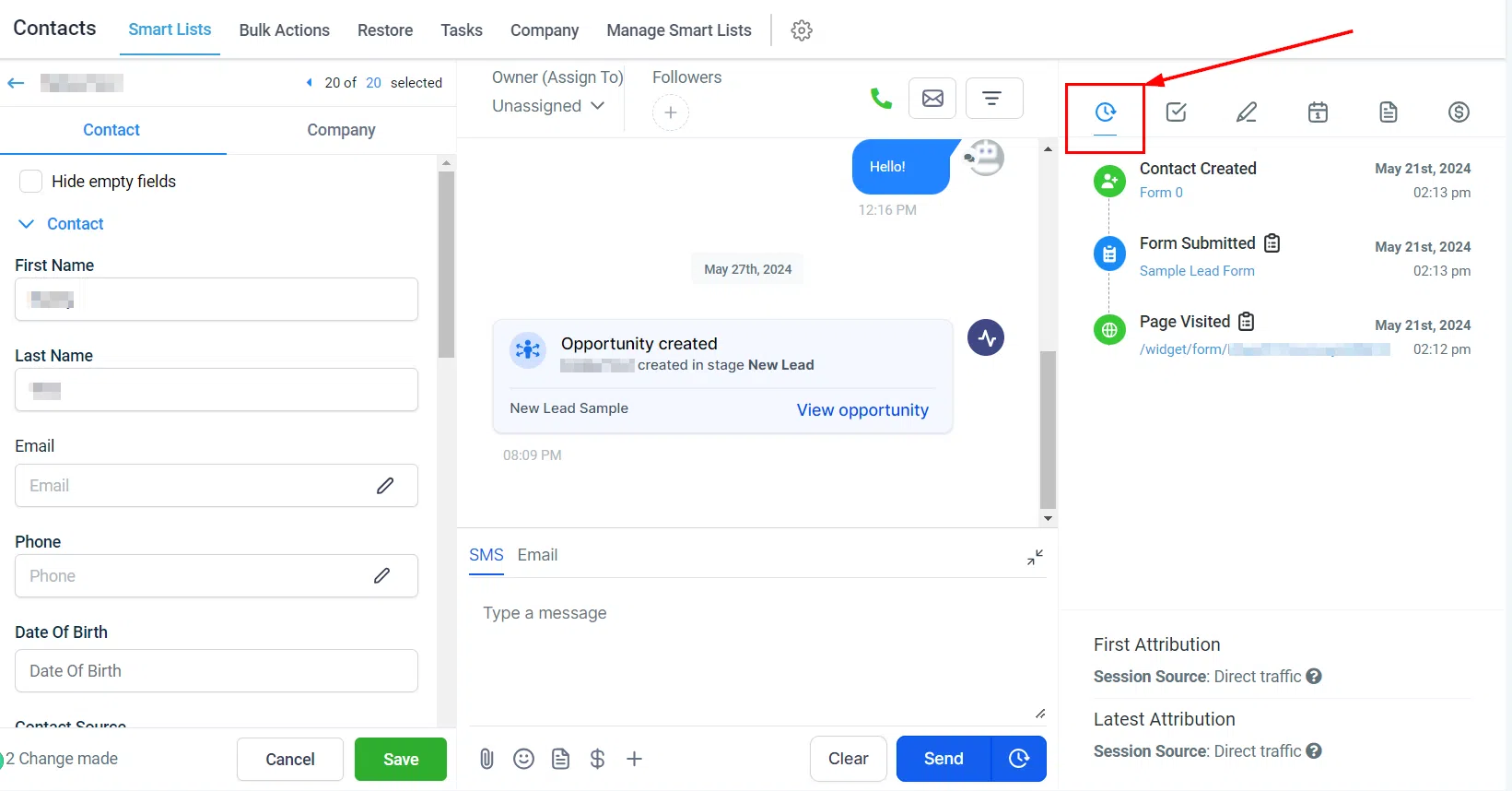
To see attribution data for a contact, navigate to the Contacts section, open the contact, and go to the Activities tab.
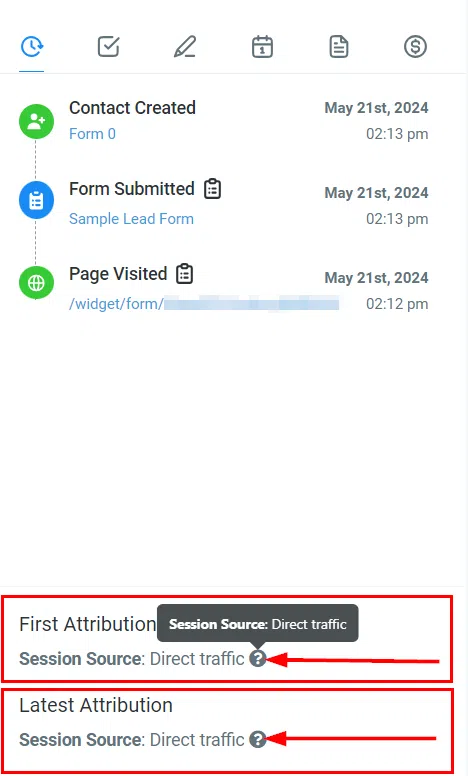
Hover over the question marks next to the session source to view detailed UTM data for that interaction.
Understanding Session Sources
- Paid Search: Contacts from paid search ads such as Google Ads.
- Paid Social: Contacts from paid social media ads on Facebook, Instagram, etc.
- Direct Traffic: Contacts who accessed your site directly by typing the URL or using a bookmark.
- Organic Search: Contacts who found your site through unpaid search engine results.
- Social Media: Contacts from non-paid social media interactions.
- Referrals: Contacts referred from another website.
- Others: Includes SMS, email, third-party integrations, and other sources not in the above categories.
Setting Up Ad Reporting
To accurately track the source of leads and conversions, set up ad reporting with the correct UTM parameters for each ad platform:
- Google Ads: Use the provided tracking template and ensure UTM parameters are correctly configured.
- Facebook Ads: Follow the setup guide to map your ad data into Growth360 accurately.
Troubleshooting
- Check for typos, extra spaces, or case sensitivity errors in your UTM parameters.
- Ensure the contact’s interaction is captured on the final URL – navigating away from the page can strip UTM parameters.
- Only use UTM parameters specified in the setup directions; avoid adding custom ones.
Common Questions
What actions trigger attribution data capture?
Form or survey submissions, calendar booking submissions, chat widget interactions, and order form submissions.
Why is my attribution data not showing?
Ensure the interaction meets the criteria above and that UTM parameters are correctly configured.
Can I track attribution across multiple sources?
Yes – Growth360 captures both first and latest interaction sources, giving you a complete view of the contact’s journey.